



The indispensable plug-in that makes my rant against Mail.app obsolete (well, except for the lack of a Quick Reply box, but that I can live without — after all, I did consider it evil until I got used to it with Opera): Mail Act-On [via].
Forget about flags and Spotlight folders: Mail Act-On is an add-on designed for just my kind of people — geeks who like their software to obey them by the keypress, and want to manage their information and organization flows in the most efficient possible way — by allowing them to assign any kind of actions to an elementary shortcut (and as I describe it I realize I might have thought of looking for something like this before ranting). As a bonus, it’s configurable directly from within Mail.app, just by adding personalized rules.
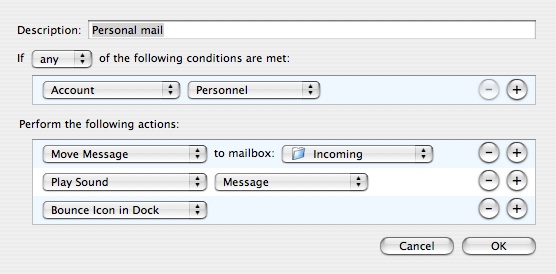
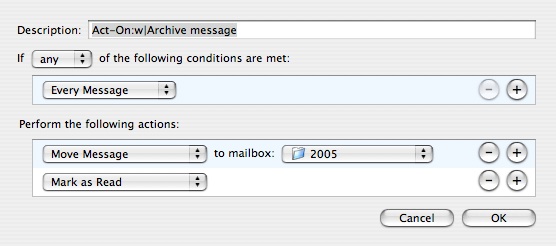
A simple rule to send my personal mail to an “Incoming” folder as soon as it arrives, followed for instance by another simple rule to archive messages when I press ‘<’ and ‘W’ (I changed the default Act-On key to French keyboards better), and there you go. Message organization at your fingertips. It’s one keypress more than in Opera, but it’s very much worth it this time (and this way it’s less prone to accidental triggering, too). Yippee!

You can’t not install this. (Together, of course, with Mail Fixer Cage Fighter in order to get rid of the horrible Mail 2.0 toolbar.)
P.S. The drawback is that it’s an interface-less plug-in that doesn’t even install any example rules, which means that, if you didn’t already know you needed it, nothing will tell you. Unlike Opera, Mail Act-On doesn’t create reveal the need. But, believe me, you do need it — a little like with Quicksilver, but QS starts working right out of the box.
P.S. Thanks for everyone who’s linking to me as an example of Mail Act-On usage. Considering how useful essential this plug-in is, I can’t believe there aren’t more link-worthy detailed blog posts about it.
Oh, and the overlay from the screenshot above (which appears when you press the Act-On activation key, as a reminder of all available shortcuts — and is also clickable, of course) got prettier since.
Want to know when I post new content to my blog? It's a simple as registering for free to an RSS aggregator (Feedly, NewsBlur, Inoreader, …) and adding www.ff00aa.com to your feeds (or www.garoo.net if you want to subscribe to all my topics). We don't need newsletters, and we don't need Twitter; RSS still exists.
A. L., 7 years ago:
macro index A '=lus<enter><enter>'
Legal information: This blog is hosted par OVH, 2 rue Kellermann, 59100 Roubaix, France, www.ovhcloud.com.
Personal data about this blog's readers are not used nor transmitted to third-parties. Comment authors can request their deletion by e-mail.
All contents © the author or quoted under fair use.

XIII, 7 years ago: